Adding exercises
- Open a workout and tap the purple Exercises button.
- Tap an exercise under Quick add, or + Custom exercise for a name of your own.
- Tap Save.
During the workout the name of the exercise appears large on screen instead of WORK, also on your Apple Watch and your Lock Screen.
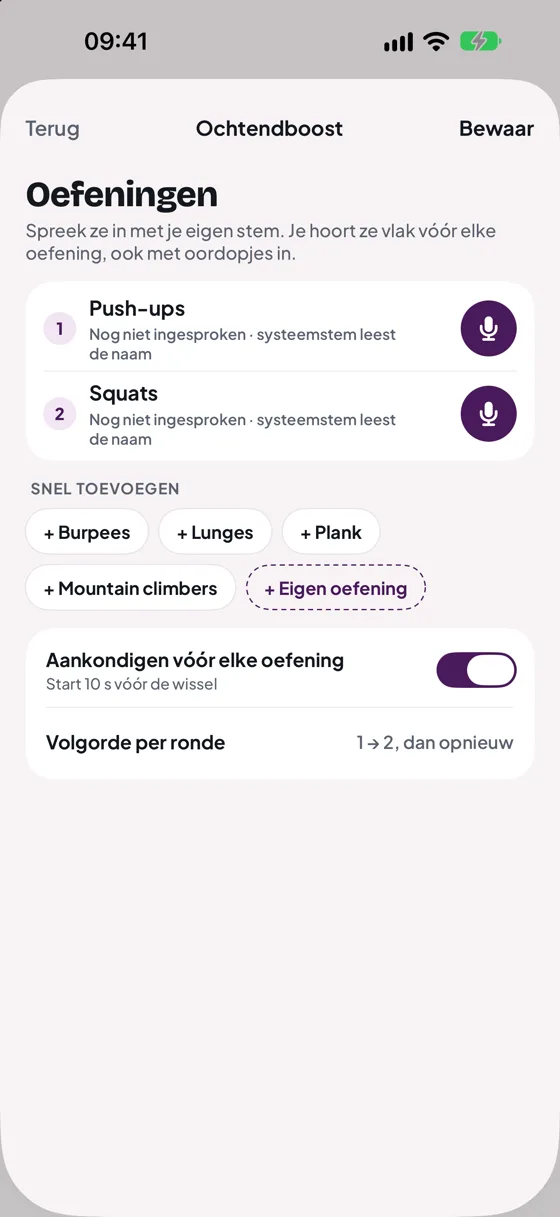
Recording with your own voice
- Tap the microphone next to an exercise.
- Say what you want to hear, for example: "Push-ups! Back straight, steady pace."
- Tap stop, or wait: after 10 seconds the recording stops by itself.
DoHiit trims the silence before and after and evens out the volume, so all your recordings sound equally loud. Tap ▶ to listen back. Press and hold an exercise to rename it, move it or delete the recording.
When do you hear the exercise?
Your recording starts 10 seconds before the exercise, usually during the rest. That way you know what is coming before you have to start. The rest screen also shows a purple card with the next exercise.
No recording? Then the system voice reads out the name. Don't want an announcement? Turn off Announce before each exercise.
Your own recording also plays when the voice in Settings is set to Off. If you pause or skip, the announcement stops.
Order per round
Round 1 is exercise 1, round 2 is exercise 2, and so on. If you have more rounds than exercises, the list starts over. With one exercise you do that one every round.
Still stuck?
Email us and we'll help you out. Tell us which iPhone you have and which version of iOS.