Your first workout
Open DoHiit and you land on Train. At the top is Quick start: tap the yellow button and your workout starts right away, with a one-minute warm-up.
Below that:
- New workout: create your own intervals.
- My workouts: everything you have saved, in your own iCloud.
- Just a timer: a stopwatch that starts right away.
- Recent: the workouts you did most recently.
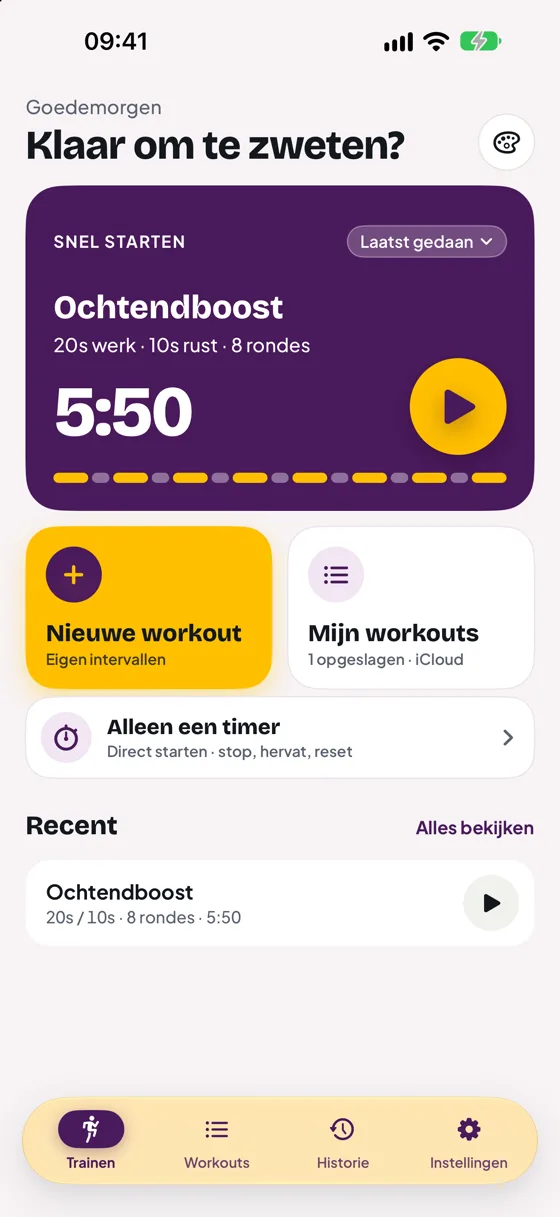
Choosing Quick start
Tap Last done on the Quick start card to choose what appears there: the workout you did last, Classic Tabata (20 s work, 10 s rest, 8 rounds) or one of your own workouts.
Just a timer
Sometimes you just want to time something. Just a timer starts right away and counts in tenths of a second. Tap Stop to pause, Resume to carry on and Reset to start over. Reset only works while the timer is stopped, so you never lose your time by accident.
The free trial
When you first open DoHiit, tap Start 14 days free. Apple then asks you to confirm the free trial; you pay nothing and no subscription starts. If you skipped it, you can start the trial later via Settings › DoHiit › Try free for 14 days first.
For 14 days you can then use everything in DoHiit for free. After that you unlock the app with a single purchase of €6.99, forever and for your whole family. More in Purchase and family.
Still stuck?
Email us and we'll help you out. Tell us which iPhone you have and which version of iOS.